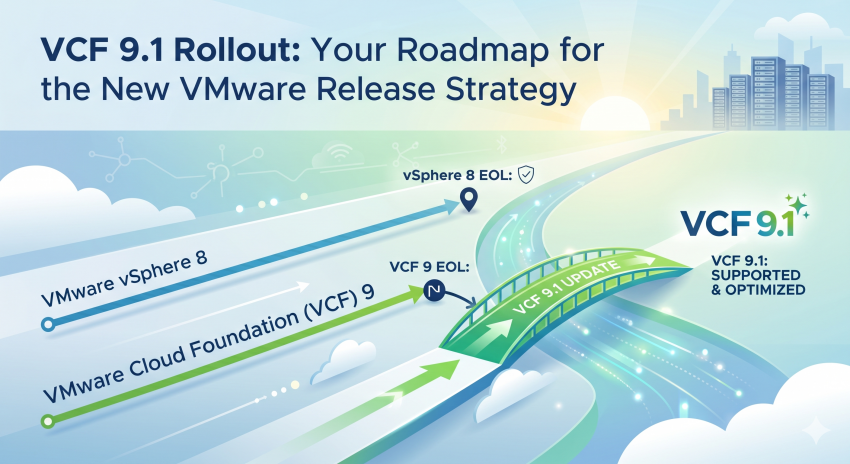
Broadcom has officially announced the general availability of VMware Cloud Foundation (VCF) 9.1. This release brings innovations designed for private clouds and production AI workloads, including 4x faster cluster upgrades and vCenter live-patching enhancements. However, beyond the new features, there is a much more critical, strategic reason why IT decision-makers and administrators need to shift their focus to VCF 9.1 immediately: The new VCF 9 Support Model and Release Cadence.
If you thought migrating to VCF 9.0 meant you could sit back and relax for a few years, a closer look at the new release schedule reveals why that is a misconception.
For more information on VCF 9.1, please check out these two blog posts,
where I’ve compiled useful links related to 9.1, as well as the newsletter containing the releases.
The Misconception: VCF 9.0 vs. vSphere 8 EOL
Many enterprises are currently migrating from vSphere 8 to the VCF 9 platform, or have just successfully completed their move to VCF 9.0. Anyone assuming that VCF 9.0 automatically grants a longer support runway than legacy vSphere 8 environments is in for a surprise.
With the launch of VCF 9, Broadcom fundamentally restructured its lifecycle policy, shifting from the traditional „5+2“ years to a „6+1“ model for the major platform. While this means the major VCF 9 platform generation receives 6 years of General Support in total, this does not apply to every single minor version.
The Catch with „Early Minors“ (9.0, 9.1, 9.2)
Under the new predictable cadence, minor releases drop roughly every 9 months. Crucially, their individual lifecycles vary drastically:
- Early Minor Releases (VCF 9.0, 9.1, and 9.2) only receive a short support window of approximately 27 months.
- Only the final minor release of a major line (VCF 9.3) will be designated as a Long-Term Support (LTS) release, receiving the full remaining 45 months of support to cover the rest of the 6-year platform lifecycle.
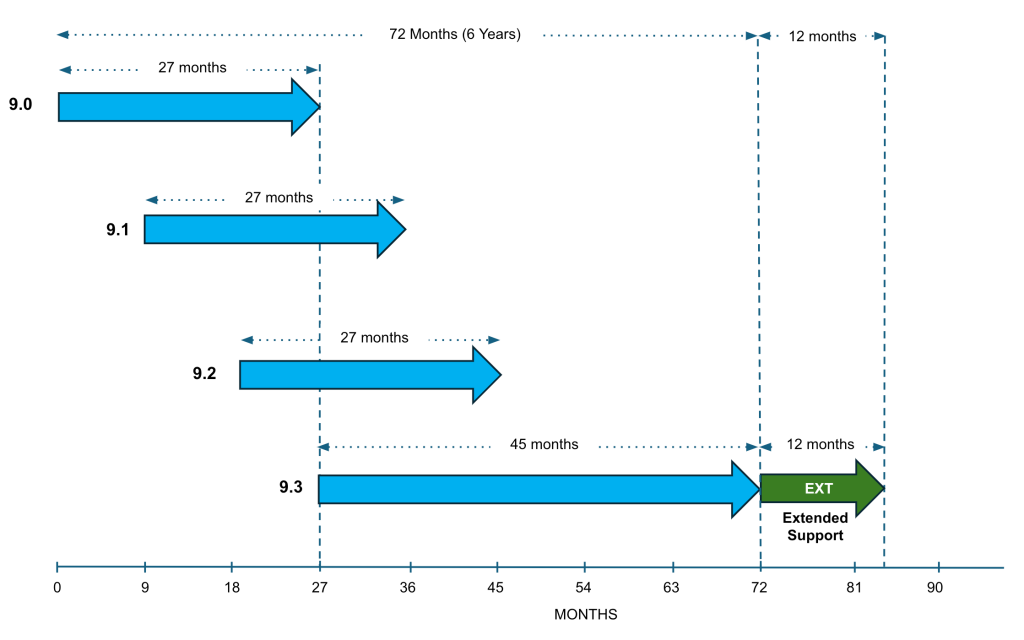
The Consequence: Because VCF 9.0 was released back in June 2025, time is running out. The End of General Support (EoGS) for version 9.0 will hit well before the support for many late vSphere 8 deployments expires. Consequently, early adopters who already migrated to VCF 9.0 are not in a safe harbor for the next five years. They must immediately begin planning their next update project to VCF 9.1.
Why Jumping Straight to VCF 9.1 Makes Perfect Sense
Whether you are still running vSphere 8 or have already taken the step to 9.0, upgrading straight to VCF 9.1 is the only logical path forward:
- Lifecycle Advantage: Moving to VCF 9.1 secures crucial extra months of general support and bridges the gap toward the final LTS version (9.3) without risking a compliance or support gap.
- Simplified, High-Velocity Upgrades: VCF 9.1 introduces important operational features. With vCenter Quick Patch and reduced downtime upgrades using the online depot, the patching process loses its complexity. Fleet upgrades are up to 4x faster.
- Cost & AI Infrastructure Efficiency: For organizations running modern containerized applications or Private AI, version 9.1 delivers advanced hardware virtualization (Advanced DirectPath I/O), integrated Avi Load Balancing, and superior data compression.
Conclusion: Rethinking Lifecycle Management
In the past, you could deploy a VMware environment and leave it untouched for half a decade. Broadcom’s new release cadence mandates a more agile, continuous approach to patching and upgrading.
Customers currently running VCF 9.0 cannot afford to wait. They need to actively prepare for 9.1 today. And for those still planning their exit strategy from vSphere 8: Ensure your migration roadmaps bypass old iterations and target VCF 9.1 directly to maximize both operational longevity and platform performance.
Helpful Resources:
- VCF 9.1 Resource Hub: To drill down into the technical specifics, check out my comprehensive VCF 9.1 Enablement & Links Post right here on the blog, containing all essential documentation and binaries.
- Streamlining Your Upgrade: For smooth operational execution, I highly recommend William Lam’s excellent upgrade helper tool. You can review the tool and its details via this specific William Lam LinkedIn Post.
Official Sources from VMware / Broadcom: