Blog Posts about VMware | Home Assistant

Schlagwort: TAM (Seite 1 von 2)

VMware good2know [CW14]

Product Releases

ProductVersionRelease DateDownloadDocumentation
Aria Operations8.18 HF504/01DownloadDocumentation

VMware Security Advisory

VMSA-2025-0005 [IMPORTANT][CVSSv3: 7.8]

Products:

  • Aria Operations

CVE(s):

  • VMware Aria Operations updates address a local privilege escalation vulnerability (CVE-2025-22231)

Description: 

  • VMware Aria Operations contains a local privilege escalation vulnerability. VMware has evaluated the severity of this issue to be in the Important severity range with a maximum CVSSv3 base score of 7.8. A malicious actor with local administrative privileges can escalate their privileges to root on the appliance running VMware Aria Operations. To remediate CVE-2025-22231 apply the patches listed in the ‚Fixed Version‘ column of the ‚Response Matrix‘ found below. VMware would like to thank thiscodecc of MoyunSec Vlab and Bing for reporting this issue to us.
ProductVersionCVEFixedWorkaround
Aria Operations8.xCVE-2025-222318.18 HF 5none
VCF5.x / 4.xCVE-2025-22231KB articlenone
Telco Cloud Plat.5.x / 4.x / 3.xCVE-2025-222318.18 HF 5none
Telco CLoud Infra.3.x / 2.xCVE-2025-222318.18 HF 5none

Product Lifecycle

ProductVersionEOL
VMware NSX3.2.507. Apr 25
VMware Bare Metal Automation for VMware Telco Cloud Platform3.018. Apr 25
VMware Cloud Provider Lifecycle Manager1.518. Apr 25
VMware Data Services Manager2.1.023. Apr 25
VMware Aria Operations for Networks6.10.027. Apr 25
VMware Aria Operations for Networks6.11.027. Apr 25
vSphere Bitfusion4.5.205. May 25
vSphere Bitfusion4.5.305. May 25
VMware Tools11.1.007. May 25
VMware Tools11.1.107. May 25
VMware Tools11.1.507. May 25
VMware Aria Automation8.17.009. May 25
VMware Aria Automation Orchestrator8.17.014. May 25
VMware Data Services Manager2.1.120. May 25
TKr 1.28.7 for vSphere 8.x1.28.728. May 25
TKr 1.28.8 for vSphere 8.x1.28.828. May 25
VMware Cloud Foundation4.531. May 25
VMware Cloud Foundation4.5.131. May 25
VMware Cloud Director Availability4.615. Jun 25
VMware Cloud Director Availability4.6.115. Jun 25
VMware Cloud Director Availability4.715. Jun 25
VMware Cloud Director Availability4.7.115. Jun 25
VMware Data Services Manager2.1.224. Jun 25
Uhana by VMware0.52.330. Jun 25
Uhana by VMware0.52.430. Jun 25
Uhana by VMware0.52.530. Jun 25
VMware vCloud Usage Meter4.830. Jun 25

KB Article

SubjectID
Error: Host <UUID> is not added to VDS value: <value> . (Error code: 9548)393260
NVMEOver TCP session to the storage lost after a reboot of the esxi hosts configured with Hostprofile393229
Rubrik VM backup failing with NFC_COMPRESSION_ERROR393216
Unable to update vsan HCL DB manually or online393204
Delete Snapshot list of Aria Automation Day 2 action is showing Snapshots that no longer exist393142
Cannot remove a Disk Group from the vSAN Cluster using vSphere UI393099
„Could not initialize plugin ‚libnvidia-vgx.so‘ for vGPU ‚profile_name‘ Failed to start the virtual machine. Module DevicePowerOn power on failed.“ error when powering on a VM with vGPU device393089
Appliance node not accepting new root password393065
Virtual Machines are either frozen or have turned invalid393060
After ESXi upgrade, a disk group with deduplication remains in an unhealthy state.392966
Offline bundle utility fails with the error: „Unable to create token after 8 retries“392946
„Password Expiry“ Alarm Not Triggered for Edge Nodes with Expired Root Passwords392915
Unable to configure NSX on nodes which were rebuilt in the cluster : Error Code 100392879
Cannot unmount volume ########## because One or more virtual machines are still registered on it.392867
Skyline adapter stops collecting and enters an error state392739
vSAN cluster showing 0 usage392730
Error: „PCI passthru device caused IOMMU fault“ when VM Powers Off Unexpectedly392714
Unable to Login to ESXi Using Domain Credentials, fails with the Error „Connection to ESXi Host Timed Out“392710
VMware Aria Orchestrator is crashing with error „java.lang.OutOfMemoryError: GC overhead limit exceeded“392695
vSAN Stretched Cluster Witness Appliance reports Network partition in vSAN Skyline Health check. Cannot add newly deployed Witness.392681
Can a VM or vmdk be recovered when VMFS metadata is overwritten?392614
After the power outage the vsan datastore not available392542
VIDM fails remediation LCMVIDM74066392519
Increasing the Width of a Data Grid in a Custom Form Using CSS392438

Podcast | Webinar | Blog Posts

Over 375 Reasons to Update VCF & Aria Operations
Architect’s Edge Live
04/29/25
Webinar
Unlocking the Latest Features in Aria Operations & VMware VCFIt’s time to move beyond just updating your systems — let’s talk about what you can actually do with those updates.With over 375 new features and updates since September, the possibilities are endless, but many of you may not realize what’s available or how to fully leverage it.
Join us for Architect’s Edge Live on Tuesday, April 29, 2025, at 11 AM PST—a casual, interactive coffee talk where we’ll break down these updates, explore what they can do for you, and help you fully maximize your VMware environment. This session is all about real conversations, real insights, and real customers—and it’s not just for those considering an update, but also for those already up-to-date.
Here’s what you’ll get from our panel of vExpert veterans—many of whom are customers themselves:
☕ What’s new: Over 375 updates and features you might not even know about🔧 Unlocking hidden capabilities: Never-before-seen features you can start using today💡 How to fully leverage your updates: Tips and tricks and LIVE DEMOS for making the most of the latest advancements❓ Open Q&A: Ask the experts what’s working, what’s not, and get advice on your VMware environment
Speaker:
Christopher Kusek – Principal Cloud Architect, VCF Division

Aria Operations 8.18 HF5
brockpeterson.com/
Blogpost
Aria Operations 8.18 HF5 just dropped this morning, fixing a few bugs and addressing several VMSAs/CVEs, go get it here!  You can apply it locally via the admin UI or via the Aria Suite Lifecycle Manager.  In this blog, I’ll apply it locally.

VCP-VCF Administrator Exam Study Group
VMware {code}
Podcast
Welcome to the VCP-VCF Administrator Exam Study Group playlist! This community-driven series is brought to you by the VMware {code} Community and {code} Coaches, designed to help you successfully prepare for the VMware Cloud Foundation (VCF) Administrator certification exam.This is a community-led initiative with no formal classes, just a collaborative effort to share knowledge and support each other’s success. Note that this series is intended to complement, not replace, the official Broadcom training classes found on the Broadcom Learning site.

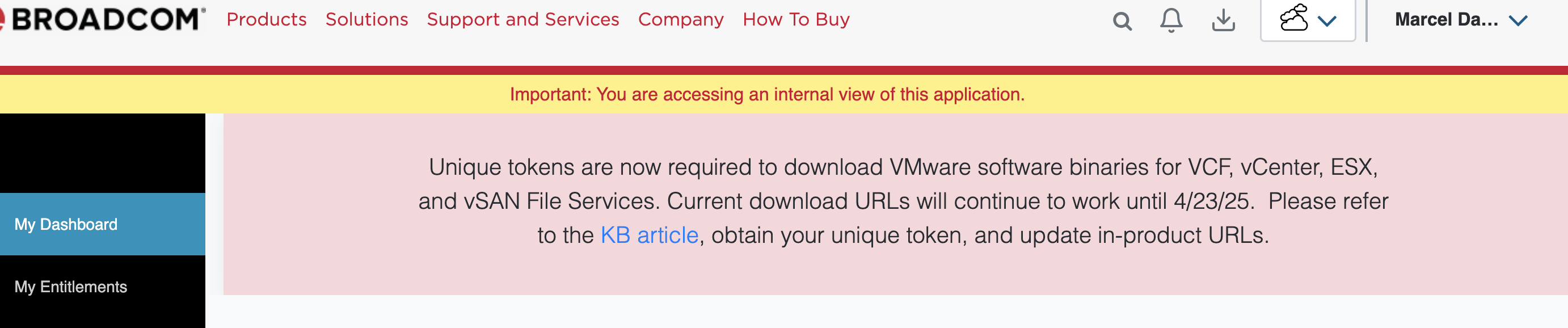
Changes to Download VCF Software

How Customers Download VCF Software Binaries

Update: Product Administrator Role needed
Effective 31.3.2025, only users with the Product Administrator role have the capability to create the token for their site.


First of all – Current download URLs will continue to work until April 23, 2025.
On Mar 24, 2025, we’ll be transitioning to a new software download method. And as mentioned before the Current download URLs will continue to work until April 23, 2025 only.
With this change to how Customers Download VCF Software Binaries, all software binaries will be downloaded from a single download site and no longer from several download sites.In the overview below you find the old vs new URL for Products with automatically download options. And also the Overview of KB Article and Blogpost about this topic.

What you need to do
Since the download token is based on your SiteID, you need to find out your SiteID with the products you want to download. Since not all customers use only one SiteID, it is possible that you will have to create a different token for each product because they are in different SiteIDs. Please follow this KB Article to generate your Token and create your Download URL. https://knowledge.broadcom.com/external/article/390098

In case you need support
If you have any questions, please talk to your VMware Contact or leave a comment here.

VMware good2know [CW09]

Product Releases 

ProductVersionDateDownloadRelease Notes
Skyline Health Diagonostic (SHD)4.0.802/27DownloadRelease Notes
vSphere8.0 u3d03/04DownloadRelease Notes
vSphere8.0 u2d03/04DownloadRelease Notes
vSphere7.0 u3s03/04DownloadRelease Notes
vSphere6.7 u3s03/04DownloadRelease Notes
Workstation17.6.303/04DownloadRelease Notes
Fusion13.6.303/04DownloadRelease Notes

VMSA-2025-0004 [CRITICAL] [CVSSv3: 7.1 – 9.3]

CVE(s)

  • VMCI heap-overflow vulnerability (CVE-2025-22224)
  • VMware ESXi arbitrary write vulnerability (CVE-2025-22225)
  • HGFS information-disclosure vulnerability (CVE-2025-22226)

Description

  • Multiple vulnerabilities in VMware ESXi, Workstation, and Fusion were privately reported to VMware. Updates are available to remediate these vulnerabilities in affected VMware products.
    VMware would like to thank Microsoft Threat Intelligence Center for reporting this issue to us.
  • FAQ: https://brcm.tech/vmsa-2025-0004
  • Workaround: None
ProductCVEFixed VersionDocumentation
ESXi 8.0 u3CVE-2025-22224, CVE-2025-22225, CVE-2025-22226ESXi80U3d-24585383FAQ
ESXi 8.0 u2CVE-2025-22224, CVE-2025-22225, CVE-2025-22226ESXi80U2d-24585300FAQ
ESXi 7.0CVE-2025-22224, CVE-2025-22225, CVE-2025-22226ESXi70U3s-24585291FAQ
ESXi 6.7CVE-2025-22224, CVE-2025-22225, CVE-2025-22226ESXi670-202503001FAQ
WorkstationCVE-2025-22224, CVE-2025-22225, CVE-2025-2222617.6.3FAQ
FusionCVE-2025-2222613.6.3FAQ
VCF 5.xCVE-2025-22224, CVE-2025-22225, CVE-2025-22226Async patch to ESXi80U3d-24585383Async Patching Guide: KB88287
VCF 4.xCVE-2025-22224, CVE-2025-22225, CVE-2025-22226Async patch to ESXi70U3s-24585291Async Patching Guide: KB88287
Telco Cloud Platform CVE-2025-22224, CVE-2025-22225, CVE-2025-22226KB389385
FAQ
Telco Cloud Platform InfrastrukturCVE-2025-22224, CVE-2025-22225, CVE-2025-22226KB389385
FAQ

vExpert

1,238 vExperts from 75 Countries
We are pleased to announce the list of 2025 vExperts. You can visit the vExpert Directory to see the list and profiles of each vExpert. All of the new and returning vExperts have demonstrated significant contributions to the community and a willingness to share their stories and expertise with others.
PROGRAM INTRODUCTION:
The VMware vExpert program honors individuals worldwide for their notable contributions to the VMware community and ecosystem. It’s not a technical certification but a recognition for your community efforts. This individual award lasts for a year, from February to January. Both customer and partner employees are eligible. We assess various community contributions from the past year to select awardees.

vExpert Program Benefits

  • One year complimentary VMUG Advantage subscription.
  • 3-year VCF or VVF license for home lab use (Dependent on you passing your VCP-VCF or your VCP-VVF exam.)
  • 50% off exams.
  • Network with over 1,300 vExperts from 77 countries.
  • Opportunity to apply for VMware Business Unit lead vExpert sub-program.
  • Invite to our private vExpert communication channels.
  • Permission to use the vExpert logo on cards, websites, etc., for one year.
  • Private & technical deep-dive webinars with VMware and VMware partners.
  • Access to private betas (subject to admission by beta teams).
  • Private pre-launch briefings via our bloggers‘ briefing pre-VMware Explore (subject to admission by product teams).
  • Featured in a public vExpert online directory
  • Access to vetted VMware & Virtualization content for your social channels through VMware Advocacy.
  • Yearly Community Leadership Reception at VMware Explore U.S.
Community Work EngagementCount
10+ Years in the Program231
15 Years in the Program43
18 Years in the Program28
Bloggers728
Book Authors58
Coder / Script Writerss90
Community Forums Moderators16
Enterprise Influencers60
HOL Volunteer41
Internal Champion157
Podcasters87
Public Speakers580
Top Contributor55
VCDX Certification Holders125
VMware Related Forums Champion802
Video Creators143
VMUG Leaders266
Volunteer Community Work212

KB Articles

SubjectID
Moving vSAN Hosts/Nodes from one cluster to another within the same vCenter.389573
Dealing with inaccessible objects in a vSAN cluster.389599
Troubleshooting Invoke-VMScript Failures During Guest OS Onboarding in Aria Automation389569
Pods do not start on Aria Automation node389553
/24 route that represents an aggregation route disappears from T0 routing table, while the small subnets are still present on the routing table.389528
The Aria Lifecycle Manager (LCM) upgrade failed with error message „Could not get VCF BOM details“389502
Aria Automation VM provisioning failed during VM allocation phase389497
vSAN compute only cluster upgrade precheck389410
Aria Operations for Networks reports an alert “Threshold Exceeded Data Source Temperature”389334
Unable to send webhook to Microsoft Teams – Aria Operations for Logs 8.18389324
„Configure Lifecycle Minion“ missing after applying the latest version of VRSLCM 8.18 Pspack 4389316
VMs lost network connection in heavy workload ESXi host389310
After upgrading to vCenter 8.0.U3 vCenter snapshot removed389305
vCLS VM IDs are zeros after patching ESXi to 8.0.3b389272
Cannot login to Aria Operations for Logs using local admin or AD account wheel continuously spinning389241
Power on task for a virtual machine failed with license key has expired389226
Application has crashed on NSX manager due to upgrade coordinator out of memory389094
vCenter Appliance Availability Dashboard is not working in Aria Operations.389078
Unable to install Telegraf agent on Linux VM integrated with Active Directory using a domain account389056
Unable to use job inputs to dynamically alter states389008
vSAN 8.x reports vSAN daemon liveness in red in vCenter UI and cmmdsTimeMachine is not running when checked from host CLI.389004
ESXi Host Disconnects When Attempting to Resize Disk of VM through pyvmomi389003
Diagnostics for VMware Cloud Foundation: Missing Log Based Findings388952

Podcast | Webinar | Blog Posts

Quick Tip – Audit vCenter Server Role & Permission Usage (Blogpost)
vCenter Server ships out of the box a number of system and custom roles, which can be used or users can create their own custom roles containing the required privileges. If you wanted to understand which roles are actively being used, the following PowerCLI snippet can help provide insights to roles that have been assigned. Furthermore, the script will also output to a file, that contains all he privileges defined for the vCenter Roles that are in active use.

VMware Telco Cloud at Mobile World Congress 2025 (Podcast)
In this episode of Virtually Speaking, we’re gearing up for Mobile World Congress 2025 with Paul Turner, VP of Products, and Anupama, Telco Lead for Product Marketing at Broadcom. We dive into Broadcom’s bold vision for the Telco Data Center, focusing on how simplification, unification, and automation are transforming network operations. With the theme “Your Telco Data Center. Simplified. Unified. Automated.”, Broadcom is set to showcase innovations that help Telcos accelerate service delivery, reduce costs, and stay ahead in a rapidly evolving market. Tune in to get a sneak peek at what’s coming at MWC 2025!

BLOG Homelab vCloud NSX Veeam Linux VSAN VMware Advocacy About ESXi to Syslog: Troubleshooting Connectivity Issues Like a Pro! (Blogpost)
When troubleshooting ESXi network and Syslog server connectivity issues, knowing the right tools can save you hours of frustration. Whether it’s an unresponsive syslog server, blocked TCP/UDP ports, this guide will help you diagnose and fix common connectivity issues quickly.

Login Messages and Banners in Aria Operations, Operations for Logs, and Automation (Blogpost)
For customers running several instances of the various Aria products, it can be helpful to tell users what instance they are actually logging in to. With Aria Operations and Operations for Logs this can be done with a login message. […]

VMware good2know [CW06]

Release Notes

ProductVersionRelease DateDownloadRelease Notes
Tanzu Data Management Console1.0.002/03DownloadRelease Notes
VMware CLoud Director10.6.101/31DownloadRelease Notes

Product Lifecycle

ProductEOL
VMware vRealize Network Insight 6.9.002/07/25
VMware Aria Automation Orchestrator 8.16.102/20/25
VMware Aria Automation Config 8.16.102/20/25
VMware Aria Automation 8.16.102/20/25
VMware Aria Automation Config 8.16.102/20/25
VMware Aria Suite Lifecycle 8.1602/28/25
VMware Aria Operations for Networks 6.11.002/28/25
Tanzu Web Service 6.4.210300000102/28/25
VMware Carbon Black 6.4.210300000102/28/25
VMware Tanzu Application Service 4.0.902/28/25
VMware Tanzu Application Service 6.4.210300000102/28/25
VMware Tanzu Platform 4.0.902/28/25
VMware Tanzu Platform 6.4.210300000102/28/25
Vmware Tanzu Platform – SM 6.4.210300000102/28/25

KB Article

SubjectID
vCLS fails to deploy/power on after changing storage in Nutanix cluster387692
Private AI Foundation catalog item deployment request from Aria Automation 8.x fails with a file not found error387678
NSX Edge status flaps between Up and Down after upgrade to NSX 4.2.1.0 or during upgrade pre-checks387653
Cannot Add New Active Directory with Integrated Windows Authentication (IWA) in VMware Identity Manager 3.3.7387652
VRSLCM Inventory Sync Failure on Aria Automation – Error Code: LCMVRAVACONFIG590024387599
Update Aria Automation Landing Page with custom message.387556
False alarms „edge_vm_present_in_nsx_inventory_not_present_in_vcenter“ getting triggered for multiple edge nodes387550
Approval Policies in Aria Automation 8.18 do not trigger Auto Approval/Rejection387523
Bootbank cannot be found at path ‚/bootbank‘387512
Unable to sync Aria Orchestrator in Aria Suite Lifecycle Manager environment because the SSH step is failing387468
The NSX upgrade tab never finishes loading and displays a spinning circle indefinitely.387435
ESXi vmnic link state flapping with the error – „Queue 0 of device vmnicX stuck, resetting the device“387420
Unable to pass through USB security key to a virtual machine on ESXi 8.0 Update 2 and newer versions387417
VMware Aria Operations for Networks Databus streaming data is not sent to endpoints387335
Integrated Load Balancer (VIP) is showing as Unavailable387329
ESXi host is not reachable over the IPV6 address387274
PSOD – #PF Exception 14 in world xxxxxxxx:VSAN_xxxxxxx IP xxxxxxxxxxxxxxxx addr xxxxxxxxxxxxxxx387244
vSAN — Host Maintenance Mode fails with „General vSAN error“387219
Resolving VM Consolidation Issues with Large Numbers of Snapshots (>32)387210

OnSite Events

LocationDate
VMUG User/con Florida03/06
VMUG User/con Dutch03/12
VMUG User/con Philadelphia03/25
VMUG Connect04/23-25
VMUG User/con German05/08
Carolina User/con05/08
Toronto User/con05/19
Denver User/con05/29
Belgian User/con06/05
Swedish User/con09/23
Explore 2025 – Las Vegas08/25
Local VMUG Events Overview

Podcast | Webinar | Blog Posts

VCF 9: Managing, Planning, Operating and Securing your private cloud (Webinar)
Please join us on Friday, February 14 at 10 AM CST, for a discussion around what’s coming in VCF 9 focusing on Managing, Planning, Operating and Securing your private cloud.
Kamesh Subramanian, Broadcom Head of Product for VCF Management and Operations, will cover capabilities and outcomes, including deployment models.

Implementing Zero-Trust with VMware vDefend Firewall (Webinar)
As you may already know, enterprise workload compromises are rising, confirmed by what experts are reporting for 2024.
Data breaches now cost an average of $9.6M per instance.
Ransomware attacks have grown to a startling new level – 20 to 25 per day.
Healthcare and financial industries remain top targets.
Speaker: Andrew Hrycaj (Networking and Security, Senior Technologist)

Implement vSAN Stretched Clusters on VCF (Webinar)
VMware vSAN Stretched Cluster is a mature high-availability solution which provides enhanced levels of flexibility and availability that extend the core capabilities of the VCF private cloud platform.
VMware Cloud Foundation supports a stretched cluster configuration between two availability zones using vSAN ESA Storage. In this session VCF Technical PM Paudie O’Riordan will cover how to implement vSAN Stretched Clusters on VCF.
Technical tips and best practices of vSAN Stretched Clusters in VCF including:
– How to design VCF Networking for multiple availability zones
– How to deploy & configure VCF stretched clusters using restful APIs
– How VCF workload domains survive a disaster using high availability
– How VCF management components perform recovery in a HA event

Workload Migration to VCF (Podcast)
In this episode of Virtually Speaking, Pete and John are joined by Puneet Chawla and Michael McLaughlin from the VMware Cloud Foundation Division at Broadcom to explore the various workload migration paths to VMware Cloud Foundation. They dive into powerful migration tools like HCX, VMware Live Recovery, and the VCF Import Tool, breaking down their capabilities and ideal use cases. Whether you’re looking to streamline migrations, minimize downtime, or optimize your cloud strategy, this discussion provides valuable insights to help you determine the best approach for your environment. Tune in to learn how to make your move to VCF as seamless as possible!

Disaster Recovery for MS SQL Server Workloads in VCF (Podcast)
Disasters are unpredictable, but your disaster recovery plan shouldn’t be. In this episode of the VMware CMTY Podcast, we’re joined by Deji Akomolafe, Product Marketing Engineer at VMware by Broadcom, to discuss how VMware Live Recovery (VLR) simplifies disaster recovery for mission-critical MS SQL Server workloads in VMware Cloud Foundation (VCF).
Why disaster recovery must be simple, repeatable, and reliable
How VMware Live Recovery (VLR) protects SQL Server clusters
Best practices for reducing downtime and ensuring seamless recovery
How VMware Cloud Foundation integrates with disaster recovery strategies
Don’t wait for a disaster to test your recovery plan! Learn how to build a resilient SQL Server disaster recovery strategy today.
Upcoming Podcast #714 – Deep Dive into VMware Private AI Foundation with Intel AMX

VMware Cloud Director 10.6.1 is Here: What’s New? (Blogpost)
Cloud computing is constantly evolving, and VMware Cloud Director (VCD) keeps advancing with new updates that strengthen security, streamline resource management, and give users greater control. VMware by Broadcom is thrilled to announce that VMware Cloud Director 10.6.1 is now available as part of the VCF (VMware Cloud Foundation) offering, starting January 31st, 2025.

  • Here’s a look at the key enhancements in this release.
  • Smarter VM Placement with Guest OS Awareness
  • Take Control of API Token Security
  • Flexible IP Retention for Sub-Providers & Managed Organizations
  • Gateway Firewall Enforcement
  • Stateful Firewall Access & Edge Cluster Configuration
  • Custom Segment Profiles – Now Shareable!
  • IPv6 Transparent Load Balancing – It’s Back!

VCP-VCF Administrator Exam Study Group (Webcast)
Getting ready to tackle the VMware Certified Professional – VMware Cloud Foundation (VCP-VCF) exam? Our VMware {code} community-led study group is here to support you every step of the way!

Starting Tuesday mornings at 9AM Eastern, 2PM GMT, we’ll follow the official exam guide, breaking down core concepts and building blocks to help everyone grow familiar with the objectives. This is an open, collaborative space with no rigid lesson plans, no official instruction. It’s just community helping community through shared discussion, resources, and insights.

Timeslots (CET)

  • Mar 25, 2025 02:00 PM
  • Feb 11, 2025 03:00 PM
  • Feb 18, 2025 03:00 PM
  • Feb 25, 2025 03:00 PM
  • Mar 4, 2025 03:00 PM
  • Mar 11, 2025 02:00 PM
  • Mar 18, 2025 02:00 PM


VMware good2know [CW03]

Release Notes

ProductVersionRelease DateDownloadRelease Notes
Data Services Manager (DSM)2.201/15DownloadRelease Notes
#Release Notes

KB Article

SubjectKB-Article
Excessive Registered State Change Notifications (RSCNs) being reported in vmkernel.log points to physical fabric issue386061

nvidia-smi‘ module causes ESXi host to become unresponsive

386012

Error „Unable to query vSAN health information. Check vSphere Client logs for details.“ seen on vSAN Skyline Health tab

386010

Tenant View of Operations Manager is stuck loading in VMware Cloud Director

385986

Changes to liagent.ini are constantly overwritten on Aria Automation VM.

385957

Network selection on deployment of new machines not working

385924

Error „no datastores found to create file volume, vsan file service may be disabled‘ while creating PVC from TKG cluster.

385907

Aria Operations for Logs agents remain at version 8.18.0 after upgrading the cluster to version 8.18.1

385854

ERROR Login failed for user – Microsoft SQL Server Integration when using Active Directory User in Aria Operations

385820

User with appropriate permissions is unable to execute actions associated with a form in VMware Aria Automation

385815

How to check End of Service (EOS) Date for Aria Suite products

385813

Unable to see the Pricing metrics after migrating price cards to policies in Aria Operations

385806

NSX EDGE Transport Nodes show „Not Available“ for both „Tunnel“ and „Node Status“

385787

Only a maximum of 12 rows of data can be included in Aria Operations for Logs schedule PDF report

385703

Cluster preparation is not ready, retry after 10s…‘ ‚Timeout, please try again later.‘ error when running reboot_helper.py

385699

#KB-Article

OnSite Events

EventDate
VMUG User/con Florida03/06
VMUG User/con Dutch03/12
VMUG User/con Philadelphia03/25
VMUG Connect04/23-25
VMUG User/con German05/08
Explore 2025 – Las Vegas08/25
#OnSite #Events #Community

Podcast | Webinar | Blog Posts

Using Log Assist in Skyline Health Diagnostics (SHD) (Webinar)
efg Skyline Health Diagnostics makes extracting and uploading Support Log Bundles to your Support Request case a one step process with „Log Assist“.  Formerly in Skyline, this feature has now migrated to the brilliant Skyline Health Diagnostics Appliance.

Stretching VMware Cloud Foundation featuring Paudie O’Riordan (Podcast)
The first episode of 2025 features one of my favorite colleagues, Paudie O’Riordan. Paudie works for the same team as I do, and although we’ve both roamed around a lot, somehow we always ended up either in the same team, or in very close proximity. Paudie is a storage guru, and the last years helped many customers with their VCF (or vSAN) proof of concept, and on top of that helped countless customers understand difficult failure scenarios in a stretched environment when things went south. In Episode 088 Paudie discusses the many dos and don’ts! This is an episode you need cannot miss out on!

Preparing Your Network for VCF (Podcast)
In this episode of the Virtually Speaking Podcast, Pete and John sit down with Kyle Gleed and Broc Yanda from Broadcom to discuss how to prepare your network for VMware Cloud Foundation (VCF). From understanding the essential network prerequisites to best practices for leveraging vDS, LAG, and NSX, they dive into the key steps to ensure a smooth VCF deployment. Whether you’re planning your first VCF deployment or looking to optimize an existing setup, this episode is packed with insights to help you succeed.

Community Events Updates (Podcast)
The first episode of 2025 features one of my favorite colleagues, Paudie O’Riordan. Paudie works for the same team as I do, and although we’ve both roamed around a lot, somehow we always ended up either in the same team, or in very close proximity. Paudie is a storage guru, and the last years helped many customers with their VCF (or vSAN) proof of concept, and on top of that helped countless customers understand difficult failure scenarios in a stretched environment when things went south. In Episode 088 Paudie discusses the many dos and don’ts! This is an episode you need cannot miss out on!

Migrating Workloads to VCF – Seamless Solutions (Webinar Serie)
This introductory session provides an overview of the solutions available for seamlessly migrating workloads to VMware Cloud Foundation (VCF). We will explore the various migration paths and provide a high-level understanding of each option, including HCX, VMware Live Recovery, and the VCF Import Tool. The goal of this session is to discover the diverse tools and techniques for migrating to VCF and gain insights into which approach might be best suited for your environment.
Speakers:
– Puneet Chawla, Technology Product Manager, VMware Cloud Foundation Division, Broadcom.
– Michael McLaughlin, Product Marketing Engineer, VMware Cloud Foundation Division, Broadcom.

NVMe Memory Tiering Configuration in VMware: 4x Your RAM! (BlogPost)
There have been a lot of new features added recently in the VMware vSphere world, and especially with VMware vSphere 8.0 Update 3. Just when you think that you might find a vSphere alternative or think there is another solution that is better, VMware proves they still lead the pack and for good reason. One of the great new features in vSphere 8.0 Update 3 is a new feature that is in Tech Preview called NVMe memory tiering. What is this and what can you do with it? Also, I give you some real world findings in using it as well as some stability issues to note.

VMware good2know [CW02]

Release Notes

ProductVersionRelease DateDownloadRelease Notes
Aria Automation8.18.1 Patch 101/07DownloadRelease Notes
#Release Notes

Security Advisory

VMSA-2025-0001 [MEDIUM][CSSv3 4.3]

Product(s)

  • Aria Automation
  • Cloud Foundation

CVE(s)

  • VMware Aria Automation SSRF vulnerability (CVE-2025-22215)

Description

  • VMware Aria Automation contains a server-side request forgery (SSRF) vulnerability. VMware has evaluated the severity of this issue to be in the Moderate severity range with a maximum CVSSv3 base score of 4.3. A malicious actor with „Organization Member“ access to Aria Automation may exploit this vulnerability enumerate internal services running on the host/network. To remediate CVE-2025-22215 apply the patches listed in the ‚Fixed Version‘ column of the ‚Response Matrix‘ found below. VMware would like to thank Bartosz Reginiak for reporting this issue to us.

Response Matrix

VersionCVEFixed VersionWorkaround
8.xCVE-2025-222158.18.1 patch 1none
4.x / 5.x (VCF)CVE-2025-22215KB 385294none
#Securtiy Advisory – VMSA-2025-0001 – Repsonse Matrix

KB Articles

SubjectKB-Article
ESXi PSOD Panic from another CPU (tcbinfo lock)385615

Unable to Uninstall VMtools in a non-vSphere environment

385565

Aria Automation Windows VM deployment timed out during cloudbase-init

385538

Unable to create Configuration Drift Template in Aria Operations

385509

„Disabled CC6 power saving state due to AMD erratum 1474

385461

User not found error when viewing projects

385430

NSX 4.2.x Bare Metal Edge fails to install

385420

Aria Automation upgrade fails with error „LCMVRAVAUPGRADE70003“ from Aria Suite lifecycle

385418

Aria Automation Orchestrator fails to run asynchronous workflow started by script when reading from Aria Automation metadata

385369

„Can’t Auto Discover vCenter“ while using orchestrator plugin for vcloud Director

385349

VMware Aria Automation 8.18.1 Cumulative Update – Patch 1

385294

#KB-Article

VMUG User/con

Florida9295 Universal Blvd, Orlando, FL 3281903/06
DutchOude Engelenseweg 1, 5222AA, ’s-Hertogenbosch03/12
PhiladelphiaValley Forge Casino Resort, 1160 First Ave, King of Prussia, PA 1940603/25
GermanKAP Europa, Osloer Str. 5, 60327 Frankfurt am Main05/08
#VMUG User/con

Podcast | Webinar | Blog Posts

Broadcom Profile Authentication Technology Transition Notice (KB Article)

Broadcom Inc., is modifying our authentication technology and will require you to activate your account after the transition is complete on January 21, 2025.  To complete the transition of your Broadcom Profile please follow the steps below…

Note: User Registration on Support Portal will not be accessible from Jan 18, 2025 at 12am PT to Jan 21, 2025 at 12am PT. We apologize for the inconvenience.

VMware Cloud Foundation Private Cloud Platform Poster (Poster)

It’s been a long time since I printed out my last VMware poster. And even though it is no longer current, the 6.x Network Port Diagram poster still hangs directly above my desk. Time to replace it with the new VCF 5.2.1 poster.

A quick how-to: Deploying the TAM Data Manager (TAM BlogPost)

Now Skyline is gone for a while, you as a TAM Customer might want to get the nice and shiny vSphere Insights Report again, and ask yourself: “What can I do to help my favorite TAM?” Well, the solution is simple, provide them with an Export from the TAM Data Manager. Some of you might still remember it, and it is back, now with support for VCF and vSphere 8. So let us deploy the TDM and make your TAM happy.

VMUG Advantage – Need to convince your boss? (VMUG)

Need help on educating your boss on the importance of purchasing your VMUG Advantage membership? We have created a justification email for you to use. Please edit or revise the letter to fit your needs.

Install VMware Identity Manager (VIDM) Patch CSP-97727 (TAM BlogPost)

You probably guessed it… this post is about installing VMware Identity Manager (VIDM) Patch CSP-97727. Although the official guidance in Broadcom Article [380348] is good, I’d like to share my experience and add some additional information.
Note that if you started all the way back with VIDM version 3.3.5 and went through all the upgrades you may run into an issue applying this patch (if you haven’t applied an earlier patch). The important article to mention here is [378767] – “vIDM node failed to boot after applying patch CSP-95247” which describes the VIDM VM no longer boots and is stuck with “Error 15: File not found”

Storage/NFS Considerations (TAM BlogPost)

My homelab was in need of some more serious storage and during this exercise I gained interesting insights that I will share in this post.
Up until recently I made use of central Synology based NFSv3-storage and two locally attached PCI flash-cards for which I was restricted (drivers) to running ESX6.7 on the single physical host (HP-DL380Gen9).

SDDC-Manager tips&tricks (TAM BlogPost)

My VCF deployment started it’s life in June 2024 based on the 5.0 BOM. I managed to install most of the Aria-suite components and added NSX-ALB(AVI) to the mix, meanwhile steadily upgrading to the latest VCF-releases and intermediate async-patches. Eventually, I even converted the very same Management-WLD from OSA-to-NFS-to-ESA and got it to work with vLCM images (both not supported btw!).

How to Apply for Your Free VCP Exam (VMUG)

VMUG Advantage members now have access to an xclusive opportunity to apply for a FREE VMware Certified Professional (VCP) exam. Whether you’re looking to elevate your skills, gain recognition, or access exclusive tools, this is your chance to take the next step in your VMware journey.

VMware good2know [CW50]

Release Notes

ProductVersionRelease DateDownloadRelease Notes
NSX4.2.1.1.1 (HP)12/10KB 382935
NSX Application Platform4.2.0.112/11DownloadRelease Notes
vSphere ESXi7.0 u3r12/12DownloadRelease Notes
vSphere ESXi8.0 u3c12/12DownloadRelease Notes
#Release Notes

KB Article

SubjectID
Compute Manager status down in NSX UI after certificate change384069
A warning message is logged every 30 seconds „CM plugin status not found for <CM UUID>, plugin may not be running on this node.“ on 2 Manager node384007
Unable to upgrade Aria Suite components as the upgrade option is dimmed in Aria Suite Lifecycle Manager383950
Unregister action failing in Aria Automation with error „Resource [id] not found“383927
SSH is crashing on all ESXi 8.0.3 hosts in vxrail environment383926
Aria Automation and Salt-Masters can no longer deploy linux salt-minions after migration of salt repositories to Broadcom domain383844
NSX Alarm DNS lookup failed383824
Unable to send webhook to Google Chat – Aria Operations for Logs 8.18.x383816
Aria Automation 8.13.1 Unable to change timezone via the web console for Aria Automation Extensibility Appliance383764
ERROR Operations for Logs authentication failed. Invalid credentials – When configuring Aria Operations for Logs integration in Aria Operations383721
NSX prepared hosts show status „Install Failed“383712
Log rotation for frr failed in the Edge nodes383711
False alerts are being raised in the AON indicating “No transport zone attached on the transport node”383689
unable to install telegraf due to system error: [WinError 32] The process cannot access the file because it is being used by another process383686
Telegraf Agent Installation failure due to Proxy Settings383683
vCenter not showing NSX managed port groups from cluster view383626
NSX-T Load Balancer Virtual Server status is Down383610
Issue with Infoblox Data source in Aria Operations for Networks383592
Missing IP Addresses on Tier0 NSX Edge Node Interfaces in CLI383576
Storage vMotion limitation for boot disks of Clustered Virtual Machines383568
Quickstart failing to configure vSAN hosts when expanding existing cluster383564
#KB Article

Podcast | Webinar | Blog Posts

vExpert Program Value & Application Process – vExpert 2025 Applications are Open! (BlogPost)

The vExpert program is not just a badge of honor; it’s an opportunity to grow your personal brand, expand your network, and gain exclusive access to resources and events. If you’ve been contributing to the VMware community, don’t miss the chance to apply before the January 10th deadline. Work with a vExpert PRO (if neeeded), amplify the message, and showcase your unique contributions to make your application shine.

vCenter 7 upgrade timed out after 60 min – stuck exporting VMware Analytics Service (BlogPost)

With the introduction of Log Assist in Version 4.0.7 last week and the killing of the Skyline Advisor, the Skyline Health Diagnostic (SHD) has come back into focus. In this article, I would like to show you how it works, what settings can be made and what functions the appliance offers.

Skyline Health Diagnostic (TAM BlogPost)

With the introduction of Log Assist in Version 4.0.7 last week and the killing of the Skyline Advisor, the Skyline Health Diagnostic (SHD) has come back into focus. In this article, I would like to show you how it works, what settings can be made and what functions the appliance offers.

VMware good2know [CW49]

Release Notes

ProductVersionRelease DateDownloadRelease Notes
Skyline Health Diagnostic4.0.712/04/2024DownloadRelease Notes
SDDC Manager5.2.1.112/06/2024Release Notes
Live Site Recovery9.0.2.112/03/2024DownloadRelease Notes
vSphere Replication9.0.2.112/04/2024DownloadRelease Notes
NSX4.2.1.112/05/2024DownloadRelease Notes
#Release Notes

VCF 5.2.1.1. BOM

[Release Notes] [VxRail Version]

ProductVersionRelease DateBuild NumberRelease Notes
Cloud Builder VM5.2.110/09/202424307856Release Notes
SDDC Manager5.2.1.112/06/202424397777Release Notes
vCenter8.0 U3c10/09/202424305161Release Notes
vSphere ESXi8.0 U3b09/17/202424280767Release Notes
vSAN Witness8.0 U3b09/17/202424280767Release Notes
NSX4.2.110/09/202424304122Release Notes
Aria Suite Lifecycle8.1807/23/202424029603Release Notes
VxRail Manager8.0.31112/06/202428839943

KB Article

SubjectID
How to view exact timestamp of the alerts in Aria Operations for Networks383575
VM’s attached to ESXi host run High CPU and server is unresponsive when navigating on them.383527
Unable to connect VMware Cloud Director to Aria Operations for Logs using Log Ingestion feature383406
Need to get properties or other IDs and information from Aria Automation resources inside Orchestrator scripts when executing day2 action383399
VMkernel Logs Flooded with „Unblock Port“ Errors383368
vSAN Skyline Health reports error – „Physical disk health retrieval issue“.383362
NSX Global Manager upgrade pre-check fails with „Active Global Manager site cannot be upgraded first. Please upgrade Standby Global Manager ‚<Secondary Global Manager Site Name>‘ before performing upgrade of this site.“383331
Missing dependency software vibs when upgrading from 7.x to 8.x383306
NSX-T Load Balancer Virtual Server status is Down383302
„IO was aborted“ alerts for Mellanox driver on ESXi 8.0.3383273
Unable to login to VMware Aria Automation system using provided credentials when integrating Aria Automation in Aria Operations383270
Event Notification not showing entire event originated from vCenter383241
„Please define loadData function in object summary component“ error in Aria Operations383217
Error LCMVROPSYSTEM25003 when trying to add a replica node to the Aria Operations environment in Aria Suite Lifecycle383214
Aria Operations license key shows as „temporary“ in the licensing section.383204
How to take a Snapshot of VMware Aria Operations for Logs383191
„/storage“ partition on Aria Suite LifeCycle is 100%383188
Active alarms seen on NSX manager only when queried from API but not visible in GUI383171
NFS datastores are not visible on the ESXi host.383164
Unable to Create a backup configuration file in VMware Aria Operations for Networks (vRNI)383152
#KBArticle

Podcast | Webinar | Blog Posts

VMware Aria Suite Lifecycle Documentation finds a New Home (BlogPost: arunnukula.com)

The VMware Aria Suite Lifecycle documentation has a new home! Previously hosted on VMware Docs, it has now been relocated to Broadcom’s TechDocs platform. Here is a collection of links that might be helpful [..]

Discussing the VCF and vSAN9 storage and data protection vision with Pete Koehler (Podcast: Unexplored Territory #086)

I just rebooted the Unexplored Territory Podcast after a break of 2 months. In this episode I discuss the VCF 9 and vSAN 9 storage and data protection vision with my colleague and good friend Pete Koehler. I hope you enjoy the show!

Aria Operations Diagnostics Revisited (BlogPost: brockpeterson.com)

Let’s discuss each of the 9 tiles, starting top left with Overall Findings. As the information bubble indicates: these are active findings based on properties and logs. To be a bit more specific they are based on two groups:

  • Properties captured by your vCenter/vSAN adapters, NSX Adapters, Aria Automation Adapters, and VCF Adapters
  • vCenter, ESXI Host, and SDDC Manager logs visible via the Aria Operations for Logs integration
  • For a list of all property and log based findings in Aria Operations 8.18.2 go here.

VMware good2know [18.11.2024]

No New Releases, BOM Updates or VMSA in the last week

Product Lifecycle

ProductEOL
VMware HCX 4.811/22/24
VMware HCX 4.8.211/22/24
VMware Aria Automation Orchestrator 8.14.111/28/24
VMware Aria Automation Config 8.14.111/28/24
VMware Aria Automation 8.14.111/28/24
VMware Centralized RAN Intelligence Controller 2.1.012/31/24
VMware Distributed RAN Intelligence Controller 2.0.412/31/24
VMware Usage Meter 4.812/31/24
Tanzu Application Service (TAS) – Partner Services 24.1.002/01/25
Tanzu Web Service 6.4.210300000102/28/25
VMware Carbon Black 6.4.210300000102/28/25
VMware Tanzu Application Service 4.0.902/28/25
VMware Tanzu Application Service 6.4.210300000102/28/25
VMware Tanzu Platform 4.0.902/28/25
VMware Tanzu Platform 6.4.210300000102/28/25
Vmware Tanzu Platform – SM 6.4.210300000102/28/25

Knowledge Base Article

SubjectKB Article
RPO violations after configuring isolation for vSphere Replication data and NFC traffic382175

Unable to send SNMP alerts to Microsoft SCOM

382144

HTTP monitoring service showing error message „Failed to create resource. Resource with same key already exists for …“ for Aria Operations 8.18.1

382129

After upgrade to Aria Automation/Aria Automation Orchestrator 8.17 or higher the proxy exclude list is no longer applied

382116

Unable to delete the datastore due to sysSwap-hls-XXX.swp file.

382098

Unable to see Oversized and Undersized metrics on virtual machines in Aria Operations

382092

Host TPM Attestation Alarm: Endorsement Key Provisioning Failure on TPM 2.0 Device

382064

Troubleshooting NSX Edge NAT/ NAT64

382055

vSphere HA initiated failover action to a single Virtual Machine even when VM monitoring disabled.

381954

„ESXi cannot connect to the KMS server“ error on Skyline Health after vCenter appliance certificate change

381893

Virtual Machine shuts down after a disk consolidation due to a locked file

381876

After changing syslog configuration using PowerCLI VMs lose connection to VSAN iSCSI targets

381855

IP table rules are not applied on the edge nodes

381851

Aria Automation „Deployments“ object is not showing in Aria Operations object browser

381830

Failure in Aria Automation Snapshot Creation in Aria Suite Lifecycle due to Datastore Validation and Health Check Issues

381828

Checking VMware ESXi Host Compatibility Before Upgrade Using the Broadcom Compatibility Guide

381824

Unable to add hard disk of the VMware Aria Operations for Logs Virtual Appliance more than 2 TB

381809

Edge deployment failed with error: „OVF certificate validation failed.“

381775

Unable to detect vmnics after PCI card upgrade– Mellanox Technologies MT27700 Family

381748

@BlueScreen: #PF Exception 14 in world xxxxx:vmast.xxxxxx IP xxxxxxxxx addr xxxxxxxxxx

381747

Unable to renew Usage Meter UI Certificates with error „Permission Denied“

381732

ESXi experiences psod during log bundle creation both locally and SHD triggered vmkmgmt_keyv

381671

Podcast | Webinar | Blog Posts

vSAN HCL DB Out of Date – Offline Update [TAM BlogPost]

During the upgrade pre-check test of the Workload domain I got the following error: vSAN HCL DB Out of Date. Because my SDDC manager has no direct internet connection I needed to get the file on my jump host. This can be done by browsing to https://partnerweb.vmware.com/service/vsan/all.json and copy the entire content and create a new file with extension”.json” […]

Get Certified: Deep Dive into VMware’s new VCP-VVF Admin and VCP-VCF Admin Exams [BlogPost]

Earning a VMware certification is a valuable milestone for IT professionals looking to advance their careers and strengthen their expertise. Whether you’re beginning with the VCP-VVF Admin or diving into the advanced VCP-VCF Admin, both certifications equip you with practical skills that enhance your effectiveness and professional value.

With VMware’s robust resources, hands-on labs, and the expert strategies shared in our recent webinar, you’ll have the tools to prepare for and succeed in your certification exams confidently.

December Global Virtual Event 2024 [VMUG Webinar]

Agenda and Keynote Coming Soon – 

Content will cover all things VCF, Security, EUC, and more! The best part? This event is completely virtual, so you can experience it all from anywhere – no travel expenses or commute required!

Windows Server 2025 is Certified on VMware vSphere [Blog Post]

We’re excited to announce that Windows Server 2025 is now officially certified on VMware vSphere 7.0 U3, 8.0, 8.0 U1, 8.0 U2, and 8.0 U3. These versions have been tested and validated to provide a stable, high-performance platform for running Windows Server 2025 as a guest operating system on virtual machines.

For troubleshooting and optimization tips when deploying Windows Server 2025 virtual machines on VMware vSphere, please see below Knowledge Base (KB) articles. These articles cover topics including VMware Tools compatibility, solutions to known issues.

VMware good2know [11.11.2024]

No New Releases, BOM Updates or VMSA in the last week

Knowledge Base Article

DynamicTypes variables, namespaces, types disappear from the Orchestrator Inventory or fail to delete – changes not reflecting correctly.381652
VMware NSX Manager responds with ‚HTTP ERROR 503‘ in web browsers and to API calls381607
ESXi 8.0.1 Host Experiences Purple Screen of Death (PSOD) with Page Fault Exception During VMFS Operations381540
IaaS servers in Cluster tab show „Last connected“ XX days ago.381521
VDS Name Synchronization Issue in NSX-T Host Details View After Rename in vCenter381512
Remediating Aria Automation inventory sync when a root password change was executed outside of Aria Suite Lifecycle Manager381421
No vCenters are visible in Aria Operations Inventory page when logged in using the All vCenters option381412
Unable to apply new certificate to the Local Manager service381400
NSX-T Load balancer nginx service crashes frequently with core dumps due to presence of LB „rule-log“ configuration.381391
nsx-nestdb fails to start automatically during ESXi host boot/reboot381319
New deployments failing for random users after enabling „Show names of users“ in Aria Automation 8.17.0381274
Aria Automation Deployment Failure „Duplicate Hostname in Active Directory“381250
Check compliance on a cluster with base image with custom addon fails with „An error occurred while connecting to depot.“381221
NSX Preparing for upgrade shows Management service is not available381174
Event Drops in VMware Aria Operations for Logs due to Pending Queue Overload381167
Don’t place vCenter and or the VASA appliance on a vVol Datastore.381164
#New Knowledge Base Article

Podcast | Webinar | Blog Post

VMware Tools 12.5.0 is ready for the latest Windows operating systems [more]

Day-Zero support for Windows Server 2025
As part of our commitment to provide the highest level of support for Windows guest operating systems on the VMware Cloud Foundation and vSphere platforms, VMware Tools 12.5.0 provides day-zero support and seamless integration in the VMware Cloud Foundation stack for the latest versions of Windows. This includes day-zero support for Windows Server 2025.
For Windows Server 2025 support, VMware Tools 12.5.0 includes several key updates:
– Compliance: All VMware Tools drivers comply with the Windows Server 2025 requirements for their classification.
– VMXNet3 Network Driver: Added support for NDIS Poll Mode and NDIS 6.89
– WDDM Graphics Driver: Simplified installation with WDDM driver helper service.
– Software-only Drivers: Applied version updates for compliance with the new standards.

Announcement for VMUG Advantage Membership [more]

At VMware Explore Barcelona, Paul Turner announced exciting, exclusive new benefits for VMware User Group Advantage members.
completion of VCF exam (VCP or VCAP), VMUG Advantage members will free personal use VCF licenses for up to 3 years.
An Office Statement about the Announcement you can find on VMUG Page.

Explore General Session (GEN1671BCN) [more]

Get ready to explore the latest in cloud and AI innovation! Kicking off the most anticipated enterprise tech event of the year, the VMware Explore 2024 General Session will showcase exciting new advancements in private cloud, AI, app delivery and the edge.

« Ältere Beiträge

© 2026 vmdaube

Theme von Anders NorénHoch ↑